Кеширование промптов
Кеширование промптов оптимизирует использование API, позволяя возобновлять работу с конкретных префиксов в ваших промптах. Это существенно сокращает время обработки и расходы для повторяющихся задач или промптов с постоянными элементами.
Есть два способа включить кеширование промптов:
- Автоматическое кеширование: добавьте одно поле
cache_controlна верхнем уровне запроса. Система автоматически применяет cache breakpoint к последнему пригодному для кеширования блоку и сдвигает его вперёд по мере роста разговоров. Лучше всего для многоходовых разговоров, где растущую историю сообщений нужно кешировать автоматически. - Явные cache breakpoints: размещайте
cache_controlпрямо на отдельных блоках контента для детального контроля над тем, что именно кешируется.
Самый простой способ начать — автоматическое кеширование:
curl https://api.anthropic.com/v1/messages \
  -H "content-type: application/json" \
  -H "x-api-key: $ANTHROPIC_API_KEY" \
  -H "anthropic-version: 2023-06-01" \
  -d '{
    "model": "claude-opus-4-7",
    "max_tokens": 1024,
    "cache_control": {"type": "ephemeral"},
    "system": "You are an AI assistant tasked with analyzing literary works. Your goal is to provide insightful commentary on themes, characters, and writing style.",
    "messages": [
      {
        "role": "user",
        "content": "Analyze the major themes in Pride and Prejudice."
      }
    ]
  }'
ant messages create --transform usage <<'YAML'
model: claude-opus-4-7
max_tokens: 1024
cache_control:
  type: ephemeral
system: >-
  You are an AI assistant tasked with analyzing literary works. Your goal is
  to provide insightful commentary on themes, characters, and writing style.
messages:
  - role: user
    content: Analyze the major themes in Pride and Prejudice.
YAML
import anthropic

client = anthropic.Anthropic()

response = client.messages.create(
    model="claude-opus-4-7",
    max_tokens=1024,
    cache_control={"type": "ephemeral"},
    system="You are an AI assistant tasked with analyzing literary works. Your goal is to provide insightful commentary on themes, characters, and writing style.",
    messages=[
        {
            "role": "user",
            "content": "Analyze the major themes in 'Pride and Prejudice'.",
        }
    ],
)
print(response.usage.model_dump_json())
import Anthropic from "@anthropic-ai/sdk";

const client = new Anthropic();

const response = await client.messages.create({
  model: "claude-opus-4-7",
  max_tokens: 1024,
  cache_control: { type: "ephemeral" },
  system:
    "You are an AI assistant tasked with analyzing literary works. Your goal is to provide insightful commentary on themes, characters, and writing style.",
  messages: [
    {
      role: "user",
      content: "Analyze the major themes in 'Pride and Prejudice'."
    }
  ]
});
console.log(response.usage);
using System;
using System.Threading.Tasks;
using Anthropic;
using Anthropic.Models.Messages;

class Program
{
    static async Task Main(string[] args)
    {
        AnthropicClient client = new();

        var parameters = new MessageCreateParams
        {
            Model = Model.ClaudeOpus4_7,
            MaxTokens = 1024,
            CacheControl = new CacheControlEphemeral(),
            System = "You are an AI assistant tasked with analyzing literary works. Your goal is to provide insightful commentary on themes, characters, and writing style.",
            Messages =
            [
                new()
                {
                    Role = Role.User,
                    Content = "Analyze the major themes in 'Pride and Prejudice'."
                }
            ]
        };

        var message = await client.Messages.Create(parameters);
        Console.WriteLine(message.Usage);
    }
}
package main

import (
	"context"
	"fmt"
	"log"

	"github.com/anthropics/anthropic-sdk-go"
)

func main() {
	client := anthropic.NewClient()

	response, err := client.Messages.New(context.TODO(), anthropic.MessageNewParams{
		Model:        anthropic.ModelClaudeOpus4_7,
		MaxTokens:    1024,
		CacheControl: anthropic.NewCacheControlEphemeralParam(),
		System: []anthropic.TextBlockParam{
			{Text: "You are an AI assistant tasked with analyzing literary works. Your goal is to provide insightful commentary on themes, characters, and writing style."},
		},
		Messages: []anthropic.MessageParam{
			anthropic.NewUserMessage(anthropic.NewTextBlock("Analyze the major themes in 'Pride and Prejudice'.")),
		},
	})
	if err != nil {
		log.Fatal(err)
	}
	fmt.Println(response.Usage)
}
import com.anthropic.client.AnthropicClient;
import com.anthropic.client.okhttp.AnthropicOkHttpClient;
import com.anthropic.models.messages.CacheControlEphemeral;
import com.anthropic.models.messages.Message;
import com.anthropic.models.messages.MessageCreateParams;
import com.anthropic.models.messages.Model;

public class PromptCachingExample {

  public static void main(String[] args) {
    AnthropicClient client = AnthropicOkHttpClient.fromEnv();

    MessageCreateParams params = MessageCreateParams.builder()
        .model(Model.CLAUDE_OPUS_4_7)
        .maxTokens(1024)
        .cacheControl(CacheControlEphemeral.builder().build())
        .system("You are an AI assistant tasked with analyzing literary works. Your goal is to provide insightful commentary on themes, characters, and writing style.")
        .addUserMessage("Analyze the major themes in 'Pride and Prejudice'.")
        .build();

    Message message = client.messages().create(params);
    System.out.println(message.usage());
  }
}
<?php

use Anthropic\Client;
use Anthropic\Messages\CacheControlEphemeral;

$client = new Client(apiKey: getenv("ANTHROPIC_API_KEY"));

$response = $client->messages->create(
    maxTokens: 1024,
    messages: [
        ['role' => 'user', 'content' => "Analyze the major themes in 'Pride and Prejudice'."]
    ],
    model: 'claude-opus-4-7',
    cacheControl: CacheControlEphemeral::with(),
    system: "You are an AI assistant tasked with analyzing literary works. Your goal is to provide insightful commentary on themes, characters, and writing style.",
);
echo json_encode($response->usage);
require "anthropic"

client = Anthropic::Client.new

response = client.messages.create(
  model: "claude-opus-4-7",
  max_tokens: 1024,
  cache_control: {type: "ephemeral"},
  system: "You are an AI assistant tasked with analyzing literary works. Your goal is to provide insightful commentary on themes, characters, and writing style.",
  messages: [
    {
      role: "user",
      content: "Analyze the major themes in 'Pride and Prejudice'."
    }
  ]
)
puts response.usage
При автоматическом кешировании система кеширует весь контент вплоть до последнего пригодного для кеширования блока включительно. В последующих запросах с тем же префиксом закешированный контент переиспользуется автоматически.
Как работает кеширование промптов
Когда вы отправляете запрос с включённым кешированием промптов:
- Система проверяет, закеширован ли префикс промпта — до указанного cache breakpoint — от недавнего запроса.
- Если найден, используется закешированная версия, уменьшая время обработки и расходы.
- Иначе система обрабатывает полный промпт и кеширует префикс, когда начинается ответ.
Это особенно полезно для:
- Промптов с большим числом примеров
- Больших объёмов контекста или справочной информации
- Повторяющихся задач с постоянными инструкциями
- Длинных многоходовых разговоров
По умолчанию кеш живёт 5 минут. Кеш обновляется бесплатно каждый раз, когда закешированный контент используется.
Цены
Кеширование промптов вводит новую структуру цен. Таблица ниже показывает цену за миллион токенов для каждой поддерживаемой модели:
| Модель | Базовые input-токены | Запись в кеш 5 мин | Запись в кеш 1 ч | Попадания в кеш и обновления | Output-токены |
|---|---|---|---|---|---|
| Claude Opus 4.7 | $5 / MTok | $6.25 / MTok | $10 / MTok | $0.50 / MTok | $25 / MTok |
| Claude Opus 4.6 | $5 / MTok | $6.25 / MTok | $10 / MTok | $0.50 / MTok | $25 / MTok |
| Claude Opus 4.5 | $5 / MTok | $6.25 / MTok | $10 / MTok | $0.50 / MTok | $25 / MTok |
| Claude Opus 4.1 | $15 / MTok | $18.75 / MTok | $30 / MTok | $1.50 / MTok | $75 / MTok |
| Claude Opus 4 | $15 / MTok | $18.75 / MTok | $30 / MTok | $1.50 / MTok | $75 / MTok |
| Claude Sonnet 4.6 | $3 / MTok | $3.75 / MTok | $6 / MTok | $0.30 / MTok | $15 / MTok |
| Claude Sonnet 4.5 | $3 / MTok | $3.75 / MTok | $6 / MTok | $0.30 / MTok | $15 / MTok |
| Claude Sonnet 4 | $3 / MTok | $3.75 / MTok | $6 / MTok | $0.30 / MTok | $15 / MTok |
| Claude Sonnet 3.7 (deprecated) | $3 / MTok | $3.75 / MTok | $6 / MTok | $0.30 / MTok | $15 / MTok |
| Claude Haiku 4.5 | $1 / MTok | $1.25 / MTok | $2 / MTok | $0.10 / MTok | $5 / MTok |
| Claude Haiku 3.5 | $0.80 / MTok | $1 / MTok | $1.6 / MTok | $0.08 / MTok | $4 / MTok |
| Claude Opus 3 (deprecated) | $15 / MTok | $18.75 / MTok | $30 / MTok | $1.50 / MTok | $75 / MTok |
| Claude Haiku 3 | $0.25 / MTok | $0.30 / MTok | $0.50 / MTok | $0.03 / MTok | $1.25 / MTok |
Поддерживаемые модели
Кеширование промптов (и автоматическое, и явное) поддерживается на всех активных моделях Claude.
Автоматическое кеширование
Автоматическое кеширование — самый простой способ включить кеширование промптов. Вместо того чтобы размещать cache_control на отдельных блоках контента, добавьте одно поле cache_control на верхнем уровне тела запроса. Система автоматически применяет cache breakpoint к последнему пригодному для кеширования блоку.
curl https://api.anthropic.com/v1/messages \
  -H "content-type: application/json" \
  -H "x-api-key: $ANTHROPIC_API_KEY" \
  -H "anthropic-version: 2023-06-01" \
  -d '{
    "model": "claude-opus-4-7",
    "max_tokens": 1024,
    "cache_control": {"type": "ephemeral"},
    "system": "You are a helpful assistant that remembers our conversation.",
    "messages": [
      {"role": "user", "content": "My name is Alex. I work on machine learning."},
      {"role": "assistant", "content": "Nice to meet you, Alex! How can I help with your ML work today?"},
      {"role": "user", "content": "What did I say I work on?"}
    ]
  }'
ant messages create --transform usage <<'YAML'
model: claude-opus-4-7
max_tokens: 1024
cache_control:
  type: ephemeral
system: You are a helpful assistant that remembers our conversation.
messages:
  - role: user
    content: My name is Alex. I work on machine learning.
  - role: assistant
    content: Nice to meet you, Alex! How can I help with your ML work today?
  - role: user
    content: What did I say I work on?
YAML
import anthropic

client = anthropic.Anthropic()

response = client.messages.create(
    model="claude-opus-4-7",
    max_tokens=1024,
    cache_control={"type": "ephemeral"},
    system="You are a helpful assistant that remembers our conversation.",
    messages=[
        {"role": "user", "content": "My name is Alex. I work on machine learning."},
        {
            "role": "assistant",
            "content": "Nice to meet you, Alex! How can I help with your ML work today?",
        },
        {"role": "user", "content": "What did I say I work on?"},
    ],
)
print(response.usage.model_dump_json())
import Anthropic from "@anthropic-ai/sdk";

const client = new Anthropic();

const response = await client.messages.create({
  model: "claude-opus-4-7",
  max_tokens: 1024,
  cache_control: { type: "ephemeral" },
  system: "You are a helpful assistant that remembers our conversation.",
  messages: [
    { role: "user", content: "My name is Alex. I work on machine learning." },
    {
      role: "assistant",
      content: "Nice to meet you, Alex! How can I help with your ML work today?"
    },
    { role: "user", content: "What did I say I work on?" }
  ]
});
console.log(response.usage);
using System;
using System.Threading.Tasks;
using Anthropic;
using Anthropic.Models.Messages;

class Program
{
    static async Task Main(string[] args)
    {
        AnthropicClient client = new();

        var parameters = new MessageCreateParams
        {
            Model = Model.ClaudeOpus4_7,
            MaxTokens = 1024,
            CacheControl = new CacheControlEphemeral(),
            System = "You are a helpful assistant that remembers our conversation.",
            Messages =
            [
                new() { Role = Role.User, Content = "My name is Alex. I work on machine learning." },
                new() { Role = Role.Assistant, Content = "Nice to meet you, Alex! How can I help with your ML work today?" },
                new() { Role = Role.User, Content = "What did I say I work on?" }
            ]
        };

        var message = await client.Messages.Create(parameters);
        Console.WriteLine(message.Usage);
    }
}
package main

import (
	"context"
	"fmt"
	"log"

	"github.com/anthropics/anthropic-sdk-go"
)

func main() {
	client := anthropic.NewClient()

	response, err := client.Messages.New(context.TODO(), anthropic.MessageNewParams{
		Model:        anthropic.ModelClaudeOpus4_7,
		MaxTokens:    1024,
		CacheControl: anthropic.NewCacheControlEphemeralParam(),
		System: []anthropic.TextBlockParam{
			{Text: "You are a helpful assistant that remembers our conversation."},
		},
		Messages: []anthropic.MessageParam{
			anthropic.NewUserMessage(anthropic.NewTextBlock("My name is Alex. I work on machine learning.")),
			anthropic.NewAssistantMessage(anthropic.NewTextBlock("Nice to meet you, Alex! How can I help with your ML work today?")),
			anthropic.NewUserMessage(anthropic.NewTextBlock("What did I say I work on?")),
		},
	})
	if err != nil {
		log.Fatal(err)
	}
	fmt.Println(response.Usage)
}
import com.anthropic.client.AnthropicClient;
import com.anthropic.client.okhttp.AnthropicOkHttpClient;
import com.anthropic.models.messages.CacheControlEphemeral;
import com.anthropic.models.messages.Message;
import com.anthropic.models.messages.MessageCreateParams;
import com.anthropic.models.messages.Model;

public class AutomaticCachingExample {

    public static void main(String[] args) {
        AnthropicClient client = AnthropicOkHttpClient.fromEnv();

        MessageCreateParams params = MessageCreateParams.builder()
                .model(Model.CLAUDE_OPUS_4_7)
                .maxTokens(1024)
                .cacheControl(CacheControlEphemeral.builder().build())
                .system("You are a helpful assistant that remembers our conversation.")
                .addUserMessage("My name is Alex. I work on machine learning.")
                .addAssistantMessage("Nice to meet you, Alex! How can I help with your ML work today?")
                .addUserMessage("What did I say I work on?")
                .build();

        Message message = client.messages().create(params);
        System.out.println(message.usage());
    }
}
<?php

use Anthropic\Client;
use Anthropic\Messages\CacheControlEphemeral;

$client = new Client(apiKey: getenv("ANTHROPIC_API_KEY"));

$response = $client->messages->create(
    maxTokens: 1024,
    messages: [
        ['role' => 'user', 'content' => 'My name is Alex. I work on machine learning.'],
        ['role' => 'assistant', 'content' => 'Nice to meet you, Alex! How can I help with your ML work today?'],
        ['role' => 'user', 'content' => 'What did I say I work on?'],
    ],
    model: 'claude-opus-4-7',
    cacheControl: CacheControlEphemeral::with(),
    system: 'You are a helpful assistant that remembers our conversation.',
);
echo json_encode($response->usage);
require "anthropic"

client = Anthropic::Client.new

response = client.messages.create(
  model: "claude-opus-4-7",
  max_tokens: 1024,
  cache_control: {type: "ephemeral"},
  system: "You are a helpful assistant that remembers our conversation.",
  messages: [
    {role: "user", content: "My name is Alex. I work on machine learning."},
    {role: "assistant", content: "Nice to meet you, Alex! How can I help with your ML work today?"},
    {role: "user", content: "What did I say I work on?"}
  ]
)
puts response.usage
Как автоматическое кеширование работает в многоходовых разговорах
При автоматическом кешировании точка кеша сдвигается вперёд автоматически по мере роста разговоров. Каждый новый запрос кеширует всё до последнего пригодного для кеширования блока, а предыдущий контент читается из кеша.
| Запрос | Контент | Поведение кеша |
|---|---|---|
| Запрос 1 | System + User(1) + Asst(1) + User(2) ◀ cache | Всё записано в кеш |
| Запрос 2 | System + User(1) + Asst(1) + User(2) + Asst(2) + User(3) ◀ cache | System до User(2) прочитано из кеша; Asst(2) + User(3) записано в кеш |
| Запрос 3 | System + User(1) + Asst(1) + User(2) + Asst(2) + User(3) + Asst(3) + User(4) ◀ cache | System до User(3) прочитано из кеша; Asst(3) + User(4) записано в кеш |
Cache breakpoint автоматически сдвигается на последний пригодный для кеширования блок в каждом запросе, так что вам не нужно обновлять какие-либо маркеры cache_control по мере роста разговора.
Поддержка TTL
По умолчанию автоматическое кеширование использует 5-минутный TTL. Вы можете указать TTL 1 час за двойную цену базовых input-токенов:
{ "cache_control": { "type": "ephemeral", "ttl": "1h" } }
Сочетание с блочным кешированием
Автоматическое кеширование совместимо с явными cache breakpoints. При совместном использовании автоматический cache breakpoint занимает один из 4 доступных слотов.
Это позволяет комбинировать оба подхода. Например, использовать явные breakpoints для независимого кеширования system prompt и tools, а автоматическое кеширование пусть занимается разговором:
{
  "model": "claude-opus-4-7",
  "max_tokens": 1024,
  "cache_control": { "type": "ephemeral" },
  "system": [
    {
      "type": "text",
      "text": "You are a helpful assistant.",
      "cache_control": { "type": "ephemeral" }
    }
  ],
  "messages": [{ "role": "user", "content": "What are the key terms?" }]
}
Что остаётся без изменений
Автоматическое кеширование использует ту же базовую инфраструктуру кеширования. Цены, минимальные пороги токенов, требования к порядку контекста и 20-блочное окно ретроспективного просмотра применяются так же, как и при явных breakpoints.
Граничные случаи
- Если у последнего блока уже есть явный
cache_controlс тем же TTL, автоматическое кеширование — no-op. - Если у последнего блока есть явный
cache_controlс другим TTL, API возвращает ошибку 400. - Если уже существует 4 явных блочных breakpoints, API возвращает ошибку 400 (слотов для автоматического кеширования не осталось).
- Если последний блок не подходит в качестве цели автоматического cache breakpoint, система молча идёт назад в поисках ближайшего подходящего блока. Если такой не найден, кеширование пропускается.
Явные cache breakpoints
Для большего контроля над кешированием вы можете размещать cache_control прямо на отдельных блоках контента. Это полезно, когда нужно кешировать разные секции, которые меняются с разной частотой, или когда нужен детальный контроль над тем, что именно кешируется.
Структурирование промпта
Размещайте статичный контент (определения tools, системные инструкции, контекст, примеры) в начале промпта. Отметьте конец переиспользуемого контента для кеширования с помощью параметра cache_control.
Префиксы кеша создаются в следующем порядке: tools, system, затем messages. Этот порядок образует иерархию, где каждый уровень строится поверх предыдущих.
Как работает автоматическая проверка префиксов
Вы можете использовать всего один cache breakpoint в конце статичного контента — система автоматически найдёт самый длинный префикс, который предыдущий запрос уже записал в кеш. Понимание того, как это работает, помогает оптимизировать стратегию кеширования.
Три ключевых принципа:
- Записи в кеш происходят только в вашем breakpoint. Пометка блока
cache_controlзаписывает ровно одну запись в кеше: хеш префикса, заканчивающегося на этом блоке. Система не записывает записи для каких-либо более ранних позиций. Поскольку хеш кумулятивный и покрывает всё вплоть до breakpoint включительно, изменение любого блока на уровне breakpoint или до него даёт другой хеш в следующем запросе. - Чтения кеша смотрят назад в поисках записей, которые сделали предыдущие запросы. В каждом запросе система вычисляет хеш префикса на вашем breakpoint и проверяет, есть ли совпадающая запись в кеше. Если её нет, она идёт назад по одному блоку за раз и проверяет, совпадает ли хеш префикса на каждой более ранней позиции с чем-то уже имеющимся в кеше. Она ищет предыдущие записи, а не стабильный контент.
- Окно ретроспективного просмотра — 20 блоков. Система проверяет не более 20 позиций на один breakpoint, считая сам breakpoint первой позицией. Если система не находит совпадающую запись в этом окне, проверка прекращается (или возобновляется от следующего явного breakpoint, если он есть).
Пример: ретроспективный просмотр в растущем разговоре
Вы добавляете новые блоки на каждом ходу и устанавливаете cache_control на финальном блоке каждого запроса:
- Ход 1: 10 блоков, breakpoint на блоке 10. Предыдущих записей кеша нет. Система записывает запись на блоке 10.
- Ход 2: 15 блоков, breakpoint на блоке 15. У блока 15 записи нет, так что система идёт назад до блока 10 и находит запись хода 1. Попадание в кеш на блоке 10; система обрабатывает только блоки 11–15 свежими и записывает новую запись на блоке 15.
- Ход 3: 35 блоков, breakpoint на блоке 35. Система проверяет 20 позиций (блоки 35–16) и ничего не находит. Запись хода 2 на блоке 15 на одну позицию за пределами окна, поэтому попадания в кеш нет. Добавление второго breakpoint на блоке 15 запускает второе окно ретроспективного просмотра там же, которое находит запись хода 2.
Типичная ошибка: breakpoint на контенте, который меняется в каждом запросе
В вашем промпте есть большой статичный системный контекст (блоки 1–5), за которым следует per-request блок с таймстемпом и сообщением пользователя (блок 6). Вы устанавливаете cache_control на блок 6:
- Запрос 1: запись в кеш на блоке 6. Хеш включает таймстемп.
- Запрос 2: таймстемп отличается, поэтому хеш префикса на блоке 6 другой. Ретроспективный просмотр идёт через блоки 5, 4, 3, 2 и 1, но система никогда не записывала запись ни на одной из этих позиций. Попадания в кеш нет. Вы платите за свежую запись в кеш на каждом запросе и никогда не получаете чтения.
Ретроспективный просмотр не находит стабильный контент за вашим breakpoint и не кеширует его. Он находит записи, которые предыдущие запросы уже сделали, а записи происходят только на breakpoints. Переместите cache_control на блок 5 — последний блок, который остаётся одинаковым между запросами, — и каждый последующий запрос будет читать закешированный префикс. Автоматическое кеширование попадает в ту же ловушку: оно размещает breakpoint на последнем пригодном для кеширования блоке, который в этой структуре и есть тот, что меняется в каждом запросе, так что используйте явный breakpoint на блоке 5 вместо этого.
Главный вывод: размещайте cache_control на последнем блоке, чей префикс идентичен в запросах, которые должны делить кеш. В растущем разговоре финальный блок работает, пока каждый ход добавляет меньше 20 блоков: более ранний контент никогда не меняется, так что ретроспективный просмотр следующего запроса находит предыдущую запись. Для промпта с изменяющимся суффиксом (таймстемпы, per-request контекст, входящее сообщение) размещайте breakpoint в конце статичного префикса, а не на изменяющемся блоке.
Когда использовать несколько breakpoints
Вы можете определить до 4 cache breakpoints, если хотите:
- Кешировать разные секции, которые меняются с разной частотой (например, tools меняются редко, а контекст обновляется ежедневно)
- Иметь больше контроля над тем, что именно кешируется
- Обеспечить попадание в кеш, когда растущий разговор отодвигает ваш breakpoint на 20 или более блоков после последней записи в кеш
Понимание стоимости cache breakpoints
Сами по себе cache breakpoints не добавляют никакой стоимости. Вы платите только за:
- Записи в кеш: когда новый контент записывается в кеш (на 25% дороже базовых input-токенов для 5-минутного TTL)
- Чтения кеша: когда закешированный контент используется (10% от базовой цены input-токенов)
- Обычные input-токены: за любой незакешированный контент
Добавление большего числа breakpoints cache_control не увеличивает ваши расходы — вы по-прежнему платите ту же сумму в зависимости от того, какой контент фактически закеширован и прочитан. Breakpoints просто дают вам контроль над тем, какие секции могут кешироваться независимо.
Стратегии и соображения при кешировании
Ограничения кеша
Минимальная длина промпта, пригодного для кеширования:
- 4096 токенов для Claude Mythos Preview, Claude Opus 4.7, Claude Opus 4.6 и Claude Opus 4.5
- 2048 токенов для Claude Sonnet 4.6
- 1024 токена для Claude Sonnet 4.5, Claude Opus 4.1, Claude Opus 4, Claude Sonnet 4 и Claude Sonnet 3.7 (deprecated)
- 4096 токенов для Claude Haiku 4.5
- 2048 токенов для Claude Haiku 3.5 (deprecated)
Более короткие промпты нельзя закешировать, даже если они помечены cache_control. Любые запросы на кеширование меньшего числа токенов будут обработаны без кеширования, и никакой ошибки не возвращается. Чтобы проверить, был ли промпт закеширован, смотрите поля использования в ответе: если и cache_creation_input_tokens, и cache_read_input_tokens равны 0, промпт не был закеширован (вероятно, потому что не достиг минимальной длины).
Если ваш промпт немного не дотягивает до минимума для используемой модели, расширение кешируемого контента до порога часто оправдано. Чтения кеша стоят значительно меньше, чем незакешированные input-токены, так что достижение минимума может уменьшить расходы для часто переиспользуемых промптов.
Для параллельных запросов учтите: запись в кеше становится доступной только после того, как начинается первый ответ. Если вам нужны попадания в кеш для параллельных запросов, подождите первого ответа перед отправкой последующих запросов.
На текущий момент «ephemeral» — единственный поддерживаемый тип кеша, который по умолчанию живёт 5 минут.
Что может быть закешировано
Большинство блоков в запросе можно кешировать. Это включает:
- Tools: определения tools в массиве
tools - System messages: блоки контента в массиве
system - Text messages: блоки контента в массиве
messages.content— и для user-, и для assistant-ходов - Images & Documents: блоки контента в массиве
messages.content, в user-ходах - Tool use и tool results: блоки контента в массиве
messages.content— и в user-, и в assistant-ходах
Каждый из этих элементов может быть закеширован — автоматически либо через пометку cache_control.
Что нельзя закешировать
Хотя большинство блоков запроса можно кешировать, есть исключения:
- Thinking blocks нельзя кешировать напрямую через
cache_control. Однако thinking blocks МОГУТ кешироваться вместе с другим контентом, когда они появляются в предыдущих assistant-ходах. Когда они закешированы таким образом, они ДЕЙСТВИТЕЛЬНО считаются input-токенами при чтении из кеша. - Суб-блоки контента (например, citations) сами по себе нельзя кешировать напрямую. Вместо этого кешируйте блок верхнего уровня.
В случае citations блоки контента документов верхнего уровня, которые служат исходным материалом для citations, могут быть закешированы. Это позволяет эффективно использовать кеширование промптов вместе с citations, кешируя документы, на которые citations будут ссылаться.
- Пустые текстовые блоки нельзя кешировать.
Что инвалидирует кеш
Модификации закешированного контента могут инвалидировать часть или весь кеш.
Как описано в Структурировании промпта, кеш следует иерархии: tools → system → messages. Изменения на каждом уровне инвалидируют этот уровень и все последующие уровни.
Таблица ниже показывает, какие части кеша инвалидируются разными типами изменений. ✘ означает, что кеш инвалидирован, а ✓ означает, что кеш остаётся валидным.
| Что меняется | Tools cache | System cache | Messages cache | Влияние |
|---|---|---|---|---|
| Определения tools | ✘ | ✘ | ✘ | Модификация определений tools (имена, описания, параметры) инвалидирует весь кеш |
| Web search toggle | ✓ | ✘ | ✘ | Включение/выключение web search модифицирует system prompt |
| Citations toggle | ✓ | ✘ | ✘ | Включение/выключение citations модифицирует system prompt |
| Speed setting | ✓ | ✘ | ✘ | Переключение между speed: "fast" и стандартной скоростью инвалидирует system и message caches |
| Tool choice | ✓ | ✓ | ✘ | Изменения параметра tool_choice затрагивают только message blocks |
| Images | ✓ | ✓ | ✘ | Добавление/удаление изображений где угодно в промпте затрагивает message blocks |
| Thinking parameters | ✓ | ✓ | ✘ | Изменения в настройках extended thinking (включение/выключение, бюджет) затрагивают message blocks |
| Не-tool результаты, передаваемые в extended thinking запросы | ✓ | ✓ | ✘ | Когда не-tool результаты передаются в запросах при включённом extended thinking, все ранее закешированные thinking blocks вырезаются из контекста, и любые сообщения в контексте, которые следуют за этими thinking blocks, удаляются из кеша. Подробнее — в Кешировании вместе с thinking blocks. |
Отслеживание производительности кеша
Отслеживайте производительность кеша через эти поля ответа API внутри usage в ответе (или события message_start при streaming):
cache_creation_input_tokens: число токенов, записанных в кеш при создании новой записи.cache_read_input_tokens: число токенов, извлечённых из кеша для этого запроса.input_tokens: число input-токенов, которые не были прочитаны из кеша и не использовались для его создания (то есть токены после последнего cache breakpoint).
Кеширование вместе с thinking blocks
При использовании extended thinking с кешированием промптов thinking blocks ведут себя особым образом:
Автоматическое кеширование вместе с другим контентом: хотя thinking blocks нельзя явно пометить cache_control, они кешируются как часть контента запроса, когда вы делаете последующие API-вызовы с tool results. Это обычно происходит во время tool use, когда вы передаёте thinking blocks обратно, чтобы продолжить разговор.
Подсчёт input-токенов: когда thinking blocks читаются из кеша, они считаются input-токенами в ваших метриках использования. Это важно для расчёта расходов и бюджета токенов.
Паттерны инвалидации кеша:
- Кеш остаётся валидным, когда только tool results передаются как user messages
- Кеш инвалидируется, когда добавляется не-tool-result user content, что приводит к вырезанию всех предыдущих thinking blocks
- Это поведение кеширования происходит даже без явных маркеров
cache_control
Подробнее об инвалидации кеша — в Что инвалидирует кеш.
Пример с tool use:
Request 1: User: "What's the weather in Paris?"
Response: [thinking_block_1] + [tool_use block 1]

Request 2:
User: ["What's the weather in Paris?"],
Assistant: [thinking_block_1] + [tool_use block 1],
User: [tool_result_1, cache=True]
Response: [thinking_block_2] + [text block 2]
# Request 2 caches its request content (not the response)
# The cache includes: user message, thinking_block_1, tool_use block 1, and tool_result_1

Request 3:
User: ["What's the weather in Paris?"],
Assistant: [thinking_block_1] + [tool_use block 1],
User: [tool_result_1, cache=True],
Assistant: [thinking_block_2] + [text block 2],
User: [Text response, cache=True]
# Non-tool-result user block causes all thinking blocks to be ignored
# This request is processed as if thinking blocks were never present
Когда включён не-tool-result user block, он обозначает новый assistant-цикл, и все предыдущие thinking blocks удаляются из контекста.
Для более детальной информации смотрите документацию по extended thinking.
Хранение и разделение кеша
- Изоляция по организации: кеши изолированы между организациями. Разные организации никогда не делят кеши, даже если используют идентичные промпты.
- Точное совпадение: попадания в кеш требуют 100% идентичных сегментов промпта, включая весь текст и изображения вплоть до блока, помеченного cache control, включительно.
- Генерация output-токенов: кеширование промптов не влияет на генерацию output-токенов. Ответ, который вы получите, будет идентичен тому, что вы получили бы без кеширования промптов.
Лучшие практики для эффективного кеширования
Чтобы оптимизировать производительность кеширования промптов:
- Начинайте с автоматического кеширования для многоходовых разговоров. Оно управляет breakpoints автоматически.
- Используйте явные блочные breakpoints, когда нужно кешировать разные секции с разной частотой изменений.
- Кешируйте стабильный, переиспользуемый контент — системные инструкции, справочную информацию, большие контексты или частые определения tools.
- Размещайте закешированный контент в начале промпта для лучшей производительности.
- Используйте cache breakpoints стратегически, чтобы разделить разные кешируемые секции префикса.
- Размещайте breakpoint на последнем блоке, который остаётся идентичным между запросами. Для промпта со статичным префиксом и изменяющимся суффиксом (таймстемпы, per-request контекст, входящее сообщение) — это конец префикса, а не изменяющийся блок.
- Регулярно анализируйте показатели попаданий в кеш и корректируйте стратегию по необходимости.
Оптимизация под разные сценарии использования
Подгоняйте стратегию кеширования промптов под ваш сценарий:
- Разговорные агенты: уменьшайте расходы и задержку для расширенных разговоров, особенно с длинными инструкциями или загруженными документами.
- Coding-ассистенты: улучшайте автокомплит и Q&A по кодовой базе, держа релевантные секции или краткую версию кодовой базы в промпте.
- Обработка больших документов: включайте полный длинный материал, в том числе изображения, в промпт без увеличения задержки ответа.
- Детальные наборы инструкций: делитесь обширными списками инструкций, процедур и примеров, чтобы тонко настроить ответы Claude. Разработчики часто включают один-два примера в промпт, но с кешированием промптов вы можете получить ещё лучшую производительность, включив 20+ разнообразных примеров высококачественных ответов.
- Агентский tool use: повышайте производительность для сценариев с множеством tool calls и итеративных изменений кода, где каждый шаг обычно требует нового API-вызова.
- Разговор с книгами, статьями, документацией, транскрипциями подкастов и другим длинным контентом: оживите любую базу знаний, вставив целиком документ(ы) в промпт и позволив пользователям задавать вопросы.
Диагностика типичных проблем
Если вы наблюдаете неожиданное поведение:
- Убедитесь, что закешированные секции идентичны между вызовами. Для явных breakpoints проверьте, что маркеры
cache_controlнаходятся в тех же местах - Проверьте, что вызовы делаются в пределах времени жизни кеша (по умолчанию 5 минут)
- Проверьте, что
tool_choiceи использование изображений остаются консистентными между вызовами - Убедитесь, что вы кешируете как минимум минимальное число токенов для используемой модели (см. Ограничения кеша). Провалы кеширования из-за длины тихие: запрос успешен, но и
cache_creation_input_tokens, иcache_read_input_tokensбудут 0 - Подтвердите, что ваш breakpoint на блоке, который остаётся идентичным между запросами. Записи в кеш происходят только на breakpoint, и если этот блок меняется (таймстемпы, per-request контекст, входящее сообщение), хеш префикса никогда не совпадёт. Ретроспективный просмотр не находит стабильный контент за breakpoint; он находит только записи, которые более ранние запросы сделали на своих собственных breakpoints
- Проверьте, что ключи в ваших блоках контента
tool_useимеют стабильный порядок, так как некоторые языки (например, Swift, Go) рандомизируют порядок ключей при JSON-конвертации, ломая кеши
Длительность кеша 1 час
Если 5 минут вам мало, Anthropic также предлагает длительность кеша 1 час за дополнительную плату.
Чтобы использовать расширенный кеш, включите ttl в определении cache_control так:
{
  "cache_control": {
    "type": "ephemeral",
    "ttl": "1h"
  }
}
Ответ будет содержать детальную информацию о кеше примерно такую:
{
  "usage": {
    "input_tokens": 2048,
    "cache_read_input_tokens": 1800,
    "cache_creation_input_tokens": 248,
    "output_tokens": 503,

    "cache_creation": {
      "ephemeral_5m_input_tokens": 456,
      "ephemeral_1h_input_tokens": 100
    }
  }
}
Обратите внимание, что текущее поле cache_creation_input_tokens равно сумме значений в объекте cache_creation.
Когда использовать 1-часовой кеш
Если у вас есть промпты, которые используются с регулярной каденцией (то есть system prompts, которые используются чаще, чем каждые 5 минут), продолжайте использовать 5-минутный кеш, так как он будет продолжать обновляться без дополнительной платы.
1-часовой кеш лучше всего использовать в следующих сценариях:
- Когда у вас есть промпты, которые, вероятно, используются реже чем каждые 5 минут, но чаще чем каждый час. Например, когда агентский side-agent займёт больше 5 минут, или когда вы храните длинный чат-разговор с пользователем и в целом ожидаете, что пользователь может не ответить в следующие 5 минут.
- Когда задержка важна и ваши follow-up промпты могут быть отправлены через более чем 5 минут.
- Когда вы хотите улучшить использование rate limit, так как попадания в кеш не вычитаются из вашего rate limit.
Смешивание разных TTL
Вы можете использовать и 1-часовой, и 5-минутный cache control в одном запросе, но с важным ограничением: записи кеша с более длинным TTL должны идти до более коротких TTL (то есть 1-часовая запись кеша должна идти до любых 5-минутных записей кеша).
При смешивании TTL API определяет три места биллинга в вашем промпте:
- Позиция
A: счётчик токенов на самом высоком попадании в кеш (или 0, если попаданий нет). - Позиция
B: счётчик токенов на самом высоком 1-часовом блокеcache_controlпослеA(или равнаA, если таких нет). - Позиция
C: счётчик токенов на последнем блокеcache_control.
С вас будет взиматься плата за:
- Токены чтения кеша для
A. - Токены записи в 1-часовой кеш для
(B - A). - Токены записи в 5-минутный кеш для
(C - B).
Вот 3 примера. Это показывает input-токены 3 запросов, каждый с разными попаданиями и промахами кеша. У каждого в результате разный вычисленный тариф, показанный в цветных боксах.
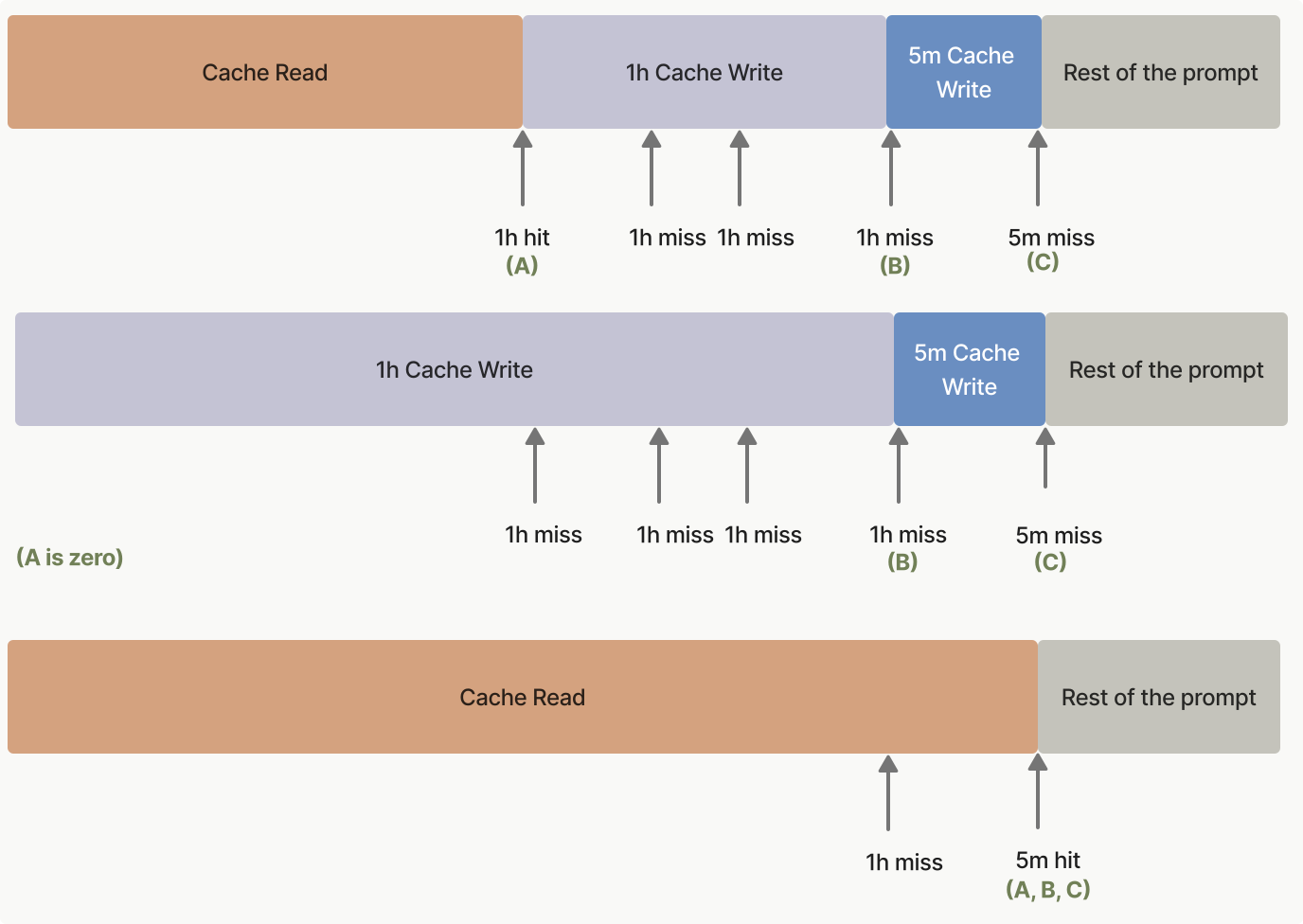
Примеры кеширования промптов
Чтобы помочь вам начать с кешированием промптов, prompt caching cookbook предоставляет детальные примеры и лучшие практики.
Следующие сниппеты кода демонстрируют разные паттерны кеширования промптов. Эти примеры показывают, как реализовать кеширование в разных сценариях, помогая понять практические применения этой возможности:
Пример кеширования большого контекста
curl https://api.anthropic.com/v1/messages \
     --header "x-api-key: $ANTHROPIC_API_KEY" \
     --header "anthropic-version: 2023-06-01" \
     --header "content-type: application/json" \
     --data \
'{
    "model": "claude-opus-4-7",
    "max_tokens": 1024,
    "system": [
        {
            "type": "text",
            "text": "You are an AI assistant tasked with analyzing legal documents."
        },
        {
            "type": "text",
            "text": "Here is the full text of a complex legal agreement: [Insert full text of a 50-page legal agreement here]",
            "cache_control": {"type": "ephemeral"}
        }
    ],
    "messages": [
        {
            "role": "user",
            "content": "What are the key terms and conditions in this agreement?"
        }
    ]
}'
ant messages create <<'YAML'
model: claude-opus-4-7
max_tokens: 1024
system:
  - type: text
    text: You are an AI assistant tasked with analyzing legal documents.
  - type: text
    text: >-
      Here is the full text of a complex legal agreement:
      [Insert full text of a 50-page legal agreement here]
    cache_control:
      type: ephemeral
messages:
  - role: user
    content: What are the key terms and conditions in this agreement?
YAML
import anthropic

client = anthropic.Anthropic()

response = client.messages.create(
    model="claude-opus-4-7",
    max_tokens=1024,
    system=[
        {
            "type": "text",
            "text": "You are an AI assistant tasked with analyzing legal documents.",
        },
        {
            "type": "text",
            "text": "Here is the full text of a complex legal agreement: [Insert full text of a 50-page legal agreement here]",
            "cache_control": {"type": "ephemeral"},
        },
    ],
    messages=[
        {
            "role": "user",
            "content": "What are the key terms and conditions in this agreement?",
        }
    ],
)
print(response.model_dump_json())
import Anthropic from "@anthropic-ai/sdk";

const client = new Anthropic();

const response = await client.messages.create({
  model: "claude-opus-4-7",
  max_tokens: 1024,
  system: [
    {
      type: "text",
      text: "You are an AI assistant tasked with analyzing legal documents."
    },
    {
      type: "text",
      text: "Here is the full text of a complex legal agreement: [Insert full text of a 50-page legal agreement here]",
      cache_control: { type: "ephemeral" }
    }
  ],
  messages: [
    {
      role: "user",
      content: "What are the key terms and conditions in this agreement?"
    }
  ]
});
console.log(response);
using System;
using System.Threading.Tasks;
using System.Collections.Generic;
using Anthropic;
using Anthropic.Models.Messages;

public class Program
{
    public static async Task Main(string[] args)
    {
        AnthropicClient client = new() { ApiKey = Environment.GetEnvironmentVariable("ANTHROPIC_API_KEY") };

        var parameters = new MessageCreateParams
        {
            Model = Model.ClaudeOpus4_7,
            MaxTokens = 1024,
            System = new MessageCreateParamsSystem(new List<TextBlockParam>
            {
                new TextBlockParam() { Text = "You are an AI assistant tasked with analyzing legal documents." },
                new TextBlockParam()
                {
                    Text = "Here is the full text of a complex legal agreement: [Insert full text of a 50-page legal agreement here]",
                    CacheControl = new CacheControlEphemeral(),
                },
            }),
            Messages = [ new() { Role = Role.User, Content = "What are the key terms and conditions in this agreement?" } ]
        };

        var message = await client.Messages.Create(parameters);
        Console.WriteLine(message);
    }
}
package main

import (
	"context"
	"fmt"
	"log"

	"github.com/anthropics/anthropic-sdk-go"
)

func main() {
	client := anthropic.NewClient()

	response, err := client.Messages.New(context.TODO(), anthropic.MessageNewParams{
		Model:     anthropic.ModelClaudeOpus4_7,
		MaxTokens: 1024,
		System: []anthropic.TextBlockParam{
			{Text: "You are an AI assistant tasked with analyzing legal documents."},
			{
				Text:         "Here is the full text of a complex legal agreement: [Insert full text of a 50-page legal agreement here]",
				CacheControl: anthropic.NewCacheControlEphemeralParam(),
			},
		},
		Messages: []anthropic.MessageParam{
			anthropic.NewUserMessage(anthropic.NewTextBlock("What are the key terms and conditions in this agreement?")),
		},
	})
	if err != nil {
		log.Fatal(err)
	}
	fmt.Printf("%+v\n", response)
}
import com.anthropic.client.AnthropicClient;
import com.anthropic.client.okhttp.AnthropicOkHttpClient;
import com.anthropic.models.messages.CacheControlEphemeral;
import com.anthropic.models.messages.Message;
import com.anthropic.models.messages.MessageCreateParams;
import com.anthropic.models.messages.Model;
import com.anthropic.models.messages.TextBlockParam;
import java.util.List;

public class LegalDocumentAnalysisExample {

  public static void main(String[] args) {
    AnthropicClient client = AnthropicOkHttpClient.fromEnv();

    MessageCreateParams params = MessageCreateParams.builder()
      .model(Model.CLAUDE_OPUS_4_7)
      .maxTokens(1024)
      .systemOfTextBlockParams(
        List.of(
          TextBlockParam.builder().text("You are an AI assistant tasked with analyzing legal documents.").build(),
          TextBlockParam.builder()
            .text("Here is the full text of a complex legal agreement: [Insert full text of a 50-page legal agreement here]")
            .cacheControl(CacheControlEphemeral.builder().build())
            .build()
        )
      )
      .addUserMessage("What are the key terms and conditions in this agreement?")
      .build();

    Message message = client.messages().create(params);
    System.out.println(message);
  }
}
<?php

use Anthropic\Client;

$client = new Client(apiKey: getenv("ANTHROPIC_API_KEY"));

$message = $client->messages->create(
    maxTokens: 1024,
    messages: [
        ['role' => 'user', 'content' => 'What are the key terms and conditions in this agreement?']
    ],
    model: 'claude-opus-4-7',
    system: [
        ['type' => 'text', 'text' => 'You are an AI assistant tasked with analyzing legal documents.'],
        [
            'type' => 'text',
            'text' => 'Here is the full text of a complex legal agreement: [Insert full text of a 50-page legal agreement here]',
            'cache_control' => ['type' => 'ephemeral']
        ]
    ],
);

echo $message->content[0]->text;
require "anthropic"

client = Anthropic::Client.new

message = client.messages.create(
  model: "claude-opus-4-7",
  max_tokens: 1024,
  system: [
    { type: "text", text: "You are an AI assistant tasked with analyzing legal documents." },
    {
      type: "text",
      text: "Here is the full text of a complex legal agreement: [Insert full text of a 50-page legal agreement here]",
      cache_control: { type: "ephemeral" }
    }
  ],
  messages: [
    { role: "user", content: "What are the key terms and conditions in this agreement?" }
  ]
)
puts message
Этот пример демонстрирует базовое использование кеширования промптов: кеширование полного текста юридического соглашения как префикса с сохранением пользовательской инструкции незакешированной.
Для первого запроса:
input_tokens: число токенов только в сообщении пользователяcache_creation_input_tokens: число токенов во всём системном сообщении, включая юридический документcache_read_input_tokens: 0 (нет попадания в кеш при первом запросе)
Для последующих запросов в пределах времени жизни кеша:
input_tokens: число токенов только в сообщении пользователяcache_creation_input_tokens: 0 (новое создание кеша отсутствует)cache_read_input_tokens: число токенов во всём закешированном системном сообщении
Кеширование определений tools
Определения tools можно кешировать, размещая cache_control на последнем tool в вашем массиве tools. Все tools, определённые до этого tool и включая его, кешируются как единый префикс.
{
  "model": "claude-opus-4-7",
  "max_tokens": 1024,
  "tools": [
    {
      "name": "get_weather",
      "description": "Get the current weather in a given location",
      "input_schema": {
        "type": "object",
        "properties": { "location": { "type": "string" } },
        "required": ["location"]
      }
    },
    {
      "name": "get_time",
      "description": "Get the current time in a given time zone",
      "input_schema": {
        "type": "object",
        "properties": { "timezone": { "type": "string" } },
        "required": ["timezone"]
      },
      "cache_control": { "type": "ephemeral" }
    }
  ],
  "messages": [{ "role": "user", "content": "What is the weather and time in New York?" }]
}
При первом запросе cache_creation_input_tokens отражает счётчик токенов всех определений tools. В последующих запросах в пределах времени жизни кеша эти токены появятся под cache_read_input_tokens вместо этого.
О детальном взаимодействии между определениями tools, defer_loading и инвалидацией кеша — в Tool use вместе с кешированием промптов.
Продолжение многоходового разговора
Пример многоходового разговора с маркером cache_control на system prompt и на финальном сообщении пользователя. Ключевая идея: каждый ход помечает финальный блок финального сообщения cache_control, так что разговор инкрементально кешируется.
curl https://api.anthropic.com/v1/messages \
     --header "x-api-key: $ANTHROPIC_API_KEY" \
     --header "anthropic-version: 2023-06-01" \
     --header "content-type: application/json" \
     --data \
'{
    "model": "claude-opus-4-7",
    "max_tokens": 1024,
    "system": [
        {
            "type": "text",
            "text": "...long system prompt",
            "cache_control": {"type": "ephemeral"}
        }
    ],
    "messages": [
        {
            "role": "user",
            "content": [
                { "type": "text", "text": "Hello, can you tell me more about the solar system?" }
            ]
        },
        {
            "role": "assistant",
            "content": "Certainly! The solar system is the collection of celestial bodies that orbit our Sun. It consists of eight planets, numerous moons, asteroids, comets, and other objects. The planets, in order from closest to farthest from the Sun, are: Mercury, Venus, Earth, Mars, Jupiter, Saturn, Uranus, and Neptune. Each planet has its own unique characteristics and features. Is there a specific aspect of the solar system you would like to know more about?"
        },
        {
            "role": "user",
            "content": [
                { "type": "text", "text": "Good to know." },
                {
                    "type": "text",
                    "text": "Tell me more about Mars.",
                    "cache_control": {"type": "ephemeral"}
                }
            ]
        }
    ]
}'
ant messages create <<'YAML'
model: claude-opus-4-7
max_tokens: 1024
system:
  - type: text
    text: "...long system prompt"
    cache_control:
      type: ephemeral
messages:
  - role: user
    content:
      - type: text
        text: Hello, can you tell me more about the solar system?
  - role: assistant
    content: >-
      Certainly! The solar system is the collection of celestial bodies that
      orbit our Sun. It consists of eight planets, numerous moons, asteroids,
      comets, and other objects. The planets, in order from closest to farthest
      from the Sun, are: Mercury, Venus, Earth, Mars, Jupiter, Saturn, Uranus,
      and Neptune. Each planet has its own unique characteristics and features.
      Is there a specific aspect of the solar system you would like to know
      more about?
  - role: user
    content:
      - type: text
        text: Good to know.
      - type: text
        text: Tell me more about Mars.
        cache_control:
          type: ephemeral
YAML
import anthropic

client = anthropic.Anthropic()

response = client.messages.create(
    model="claude-opus-4-7",
    max_tokens=1024,
    system=[
        {
            "type": "text",
            "text": "...long system prompt",
            "cache_control": {"type": "ephemeral"},
        }
    ],
    messages=[
        {
            "role": "user",
            "content": [
                { "type": "text", "text": "Hello, can you tell me more about the solar system?" }
            ],
        },
        {
            "role": "assistant",
            "content": "Certainly! The solar system is the collection of celestial bodies that orbit our Sun. It consists of eight planets, numerous moons, asteroids, comets, and other objects. The planets, in order from closest to farthest from the Sun, are: Mercury, Venus, Earth, Mars, Jupiter, Saturn, Uranus, and Neptune. Each planet has its own unique characteristics and features. Is there a specific aspect of the solar system you'd like to know more about?",
        },
        {
            "role": "user",
            "content": [
                {"type": "text", "text": "Good to know."},
                {
                    "type": "text",
                    "text": "Tell me more about Mars.",
                    "cache_control": {"type": "ephemeral"},
                },
            ],
        },
    ],
)
print(response.model_dump_json())
import Anthropic from "@anthropic-ai/sdk";

const client = new Anthropic();

const response = await client.messages.create({
  model: "claude-opus-4-7",
  max_tokens: 1024,
  system: [
    { type: "text", text: "...long system prompt", cache_control: { type: "ephemeral" } }
  ],
  messages: [
    { role: "user", content: [{ type: "text", text: "Hello, can you tell me more about the solar system?" }] },
    { role: "assistant", content: "Certainly! The solar system is the collection of celestial bodies that orbit our Sun. It consists of eight planets, numerous moons, asteroids, comets, and other objects. The planets, in order from closest to farthest from the Sun, are: Mercury, Venus, Earth, Mars, Jupiter, Saturn, Uranus, and Neptune. Each planet has its own unique characteristics and features. Is there a specific aspect of the solar system you'd like to know more about?" },
    {
      role: "user",
      content: [
        { type: "text", text: "Good to know." },
        { type: "text", text: "Tell me more about Mars.", cache_control: { type: "ephemeral" } }
      ]
    }
  ]
});
console.log(response);
using Anthropic;
using Anthropic.Models.Messages;
using System.Collections.Generic;

AnthropicClient client = new();

var parameters = new MessageCreateParams
{
    Model = Model.ClaudeOpus4_7,
    MaxTokens = 1024,
    System = new MessageCreateParamsSystem(new List<TextBlockParam>
    {
        new TextBlockParam()
        {
            Text = "...long system prompt",
            CacheControl = new CacheControlEphemeral(),
        },
    }),
    Messages =
    [
        new()
        {
            Role = Role.User,
            Content = new MessageParamContent(new List<ContentBlockParam>
            {
                new ContentBlockParam(new TextBlockParam("Hello, can you tell me more about the solar system?")),
            }),
        },
        new()
        {
            Role = Role.Assistant,
            Content = "Certainly! The solar system is the collection of celestial bodies that orbit our Sun. It consists of eight planets, numerous moons, asteroids, comets, and other objects. The planets, in order from closest to farthest from the Sun, are: Mercury, Venus, Earth, Mars, Jupiter, Saturn, Uranus, and Neptune. Each planet has its own unique characteristics and features. Is there a specific aspect of the solar system you would like to know more about?"
        },
        new()
        {
            Role = Role.User,
            Content = new MessageParamContent(new List<ContentBlockParam>
            {
                new ContentBlockParam(new TextBlockParam("Good to know.")),
                new ContentBlockParam(new TextBlockParam()
                {
                    Text = "Tell me more about Mars.",
                    CacheControl = new CacheControlEphemeral(),
                }),
            })
        }
    ]
};

var message = await client.Messages.Create(parameters);
Console.WriteLine(message);
package main

import (
	"context"
	"fmt"
	"log"

	"github.com/anthropics/anthropic-sdk-go"
)

func main() {
	client := anthropic.NewClient()

	response, err := client.Messages.New(context.TODO(), anthropic.MessageNewParams{
		Model:     anthropic.ModelClaudeOpus4_7,
		MaxTokens: 1024,
		System: []anthropic.TextBlockParam{
			{
				Text:         "...long system prompt",
				CacheControl: anthropic.NewCacheControlEphemeralParam(),
			},
		},
		Messages: []anthropic.MessageParam{
			anthropic.NewUserMessage(anthropic.NewTextBlock("Hello, can you tell me more about the solar system?")),
			anthropic.NewAssistantMessage(anthropic.NewTextBlock("Certainly! The solar system is the collection of celestial bodies that orbit our Sun. It consists of eight planets, numerous moons, asteroids, comets, and other objects. The planets, in order from closest to farthest from the Sun, are: Mercury, Venus, Earth, Mars, Jupiter, Saturn, Uranus, and Neptune. Each planet has its own unique characteristics and features. Is there a specific aspect of the solar system you would like to know more about?")),
			{
				Role: anthropic.MessageParamRoleUser,
				Content: []anthropic.ContentBlockParamUnion{
					anthropic.NewTextBlock("Good to know."),
					{OfText: &anthropic.TextBlockParam{
						Text:         "Tell me more about Mars.",
						CacheControl: anthropic.NewCacheControlEphemeralParam(),
					}},
				},
			},
		},
	})
	if err != nil {
		log.Fatal(err)
	}
	fmt.Println(response)
}
import com.anthropic.client.AnthropicClient;
import com.anthropic.client.okhttp.AnthropicOkHttpClient;
import com.anthropic.models.messages.CacheControlEphemeral;
import com.anthropic.models.messages.ContentBlockParam;
import com.anthropic.models.messages.Message;
import com.anthropic.models.messages.MessageCreateParams;
import com.anthropic.models.messages.Model;
import com.anthropic.models.messages.TextBlockParam;
import java.util.List;

public class ConversationWithCacheControlExample {

  public static void main(String[] args) {
    AnthropicClient client = AnthropicOkHttpClient.fromEnv();

    // Создаём ephemeral system prompt
    TextBlockParam systemPrompt = TextBlockParam.builder()
      .text("...long system prompt")
      .cacheControl(CacheControlEphemeral.builder().build())
      .build();

    // Создаём параметры message
    MessageCreateParams params = MessageCreateParams.builder()
      .model(Model.CLAUDE_OPUS_4_7)
      .maxTokens(1024)
      .systemOfTextBlockParams(List.of(systemPrompt))
      // Первое пользовательское сообщение (без cache control)
      .addUserMessage("Hello, can you tell me more about the solar system?")
      // Ответ ассистента
      .addAssistantMessage(
        "Certainly! The solar system is the collection of celestial bodies that orbit our Sun. It consists of eight planets, numerous moons, asteroids, comets, and other objects. The planets, in order from closest to farthest from the Sun, are: Mercury, Venus, Earth, Mars, Jupiter, Saturn, Uranus, and Neptune. Each planet has its own unique characteristics and features. Is there a specific aspect of the solar system you would like to know more about?"
      )
      // Второе пользовательское сообщение (с cache control)
      .addUserMessageOfBlockParams(
        List.of(
          ContentBlockParam.ofText(TextBlockParam.builder().text("Good to know.").build()),
          ContentBlockParam.ofText(
            TextBlockParam.builder()
              .text("Tell me more about Mars.")
              .cacheControl(CacheControlEphemeral.builder().build())
              .build()
          )
        )
      )
      .build();

    Message message = client.messages().create(params);
    System.out.println(message);
  }
}
<?php

use Anthropic\Client;

$client = new Client(apiKey: getenv("ANTHROPIC_API_KEY"));

$message = $client->messages->create(
    maxTokens: 1024,
    messages: [
        [
            'role' => 'user',
            'content' => [
                [
                    'type' => 'text',
                    'text' => 'Hello, can you tell me more about the solar system?'
                ]
            ]
        ],
        [
            'role' => 'assistant',
            'content' => "Certainly! The solar system is the collection of celestial bodies that orbit our Sun. It consists of eight planets, numerous moons, asteroids, comets, and other objects. The planets, in order from closest to farthest from the Sun, are: Mercury, Venus, Earth, Mars, Jupiter, Saturn, Uranus, and Neptune. Each planet has its own unique characteristics and features. Is there a specific aspect of the solar system you would like to know more about?"
        ],
        [
            'role' => 'user',
            'content' => [
                ['type' => 'text', 'text' => 'Good to know.'],
                [
                    'type' => 'text',
                    'text' => 'Tell me more about Mars.',
                    'cache_control' => ['type' => 'ephemeral']
                ]
            ]
        ]
    ],
    model: 'claude-opus-4-7',
    system: [
        [
            'type' => 'text',
            'text' => '...long system prompt',
            'cache_control' => ['type' => 'ephemeral']
        ]
    ],
);

echo $message->content[0]->text;
require "anthropic"

client = Anthropic::Client.new

message = client.messages.create(
  model: "claude-opus-4-7",
  max_tokens: 1024,
  system: [
    {
      type: "text",
      text: "...long system prompt",
      cache_control: { type: "ephemeral" }
    }
  ],
  messages: [
    {
      role: "user",
      content: [
        {
          type: "text",
          text: "Hello, can you tell me more about the solar system?"
        }
      ]
    },
    {
      role: "assistant",
      content: "Certainly! The solar system is the collection of celestial bodies that orbit our Sun. It consists of eight planets, numerous moons, asteroids, comets, and other objects. The planets, in order from closest to farthest from the Sun, are: Mercury, Venus, Earth, Mars, Jupiter, Saturn, Uranus, and Neptune. Each planet has its own unique characteristics and features. Is there a specific aspect of the solar system you would like to know more about?"
    },
    {
      role: "user",
      content: [
        { type: "text", text: "Good to know." },
        {
          type: "text",
          text: "Tell me more about Mars.",
          cache_control: { type: "ephemeral" }
        }
      ]
    }
  ]
)
puts message
Этот пример демонстрирует, как использовать кеширование промптов в многоходовом разговоре.
В каждом ходу финальный блок финального сообщения помечен cache_control, чтобы разговор мог инкрементально кешироваться. Система автоматически ищет и использует самую длинную ранее закешированную последовательность блоков для follow-up сообщений. То есть блоки, которые ранее были помечены блоком cache_control, позже не помечаются, но они всё равно будут считаться попаданием в кеш (а также обновлением кеша!), если попадают в него в пределах 5 минут.
Кроме того, обратите внимание, что параметр cache_control размещён на system message. Это нужно, чтобы, если оно будет вытеснено из кеша (после того как не используется больше 5 минут), оно будет добавлено обратно в кеш при следующем запросе.
Этот подход полезен для поддержания контекста в продолжающихся разговорах без повторной обработки одной и той же информации.
Когда это настроено правильно, в ответе usage каждого запроса вы должны увидеть следующее:
input_tokens: число токенов в новом сообщении пользователя (будет минимальным)cache_creation_input_tokens: число токенов в новых ходах ассистента и пользователяcache_read_input_tokens: число токенов в разговоре до предыдущего хода
Всё вместе: несколько cache breakpoints
Полный пример использования всех 4 cache breakpoints: tools, instructions, RAG context, conversation history.
curl https://api.anthropic.com/v1/messages \
     --header "x-api-key: $ANTHROPIC_API_KEY" \
     --header "anthropic-version: 2023-06-01" \
     --header "content-type: application/json" \
     --data \
'{
    "model": "claude-opus-4-7",
    "max_tokens": 1024,
    "tools": [
        {
            "name": "search_documents",
            "description": "Search through the knowledge base",
            "input_schema": {
                "type": "object",
                "properties": { "query": { "type": "string", "description": "Search query" } },
                "required": ["query"]
            }
        },
        {
            "name": "get_document",
            "description": "Retrieve a specific document by ID",
            "input_schema": {
                "type": "object",
                "properties": { "doc_id": { "type": "string", "description": "Document ID" } },
                "required": ["doc_id"]
            },
            "cache_control": {"type": "ephemeral"}
        }
    ],
    "system": [
        {
            "type": "text",
            "text": "You are a helpful research assistant with access to a document knowledge base.\n\n# Instructions\n- Always search for relevant documents before answering\n- Provide citations for your sources\n- Be objective and accurate in your responses\n- If multiple documents contain relevant information, synthesize them\n- Acknowledge when information is not available in the knowledge base",
            "cache_control": {"type": "ephemeral"}
        },
        {
            "type": "text",
            "text": "# Knowledge Base Context\n\nHere are the relevant documents for this conversation:\n\n## Document 1: Solar System Overview\nThe solar system consists of the Sun and all objects that orbit it...\n\n## Document 2: Planetary Characteristics\nEach planet has unique features. Mercury is the smallest planet...\n\n## Document 3: Mars Exploration\nMars has been a target of exploration for decades...\n\n[Additional documents...]",
            "cache_control": {"type": "ephemeral"}
        }
    ],
    "messages": [
        { "role": "user", "content": "Can you search for information about Mars rovers?" },
        {
            "role": "assistant",
            "content": [
                { "type": "tool_use", "id": "tool_1", "name": "search_documents", "input": {"query": "Mars rovers"} }
            ]
        },
        {
            "role": "user",
            "content": [
                { "type": "tool_result", "tool_use_id": "tool_1", "content": "Found 3 relevant documents: Document 3 (Mars Exploration), Document 7 (Rover Technology), Document 9 (Mission History)" }
            ]
        },
        {
            "role": "assistant",
            "content": [
                { "type": "text", "text": "I found 3 relevant documents about Mars rovers. Let me get more details from the Mars Exploration document." }
            ]
        },
        {
            "role": "user",
            "content": [
                {
                    "type": "text",
                    "text": "Yes, please tell me about the Perseverance rover specifically.",
                    "cache_control": {"type": "ephemeral"}
                }
            ]
        }
    ]
}'
ant messages create <<'YAML'
model: claude-opus-4-7
max_tokens: 1024
tools:
  - name: search_documents
    description: Search through the knowledge base
    input_schema:
      type: object
      properties:
        query:
          type: string
          description: Search query
      required: [query]
  - name: get_document
    description: Retrieve a specific document by ID
    input_schema:
      type: object
      properties:
        doc_id:
          type: string
          description: Document ID
      required: [doc_id]
    cache_control:
      type: ephemeral
system:
  - type: text
    text: |-
      You are a helpful research assistant with access to a document knowledge base.

      # Instructions
      - Always search for relevant documents before answering
      - Provide citations for your sources
      - Be objective and accurate in your responses
      - If multiple documents contain relevant information, synthesize them
      - Acknowledge when information is not available in the knowledge base
    cache_control:
      type: ephemeral
  - type: text
    text: |-
      # Knowledge Base Context

      Here are the relevant documents for this conversation:

      ## Document 1: Solar System Overview
      The solar system consists of the Sun and all objects that orbit it...

      ## Document 2: Planetary Characteristics
      Each planet has unique features. Mercury is the smallest planet...

      ## Document 3: Mars Exploration
      Mars has been a target of exploration for decades...

      [Additional documents...]
    cache_control:
      type: ephemeral
messages:
  - role: user
    content: Can you search for information about Mars rovers?
  - role: assistant
    content:
      - type: tool_use
        id: tool_1
        name: search_documents
        input:
          query: Mars rovers
  - role: user
    content:
      - type: tool_result
        tool_use_id: tool_1
        content: >-
          Found 3 relevant documents: Document 3 (Mars Exploration),
          Document 7 (Rover Technology), Document 9 (Mission History)
  - role: assistant
    content:
      - type: text
        text: >-
          I found 3 relevant documents about Mars rovers. Let me get more
          details from the Mars Exploration document.
  - role: user
    content:
      - type: text
        text: Yes, please tell me about the Perseverance rover specifically.
        cache_control:
          type: ephemeral
YAML
import anthropic

client = anthropic.Anthropic()

response = client.messages.create(
    model="claude-opus-4-7",
    max_tokens=1024,
    tools=[
        {
            "name": "search_documents",
            "description": "Search through the knowledge base",
            "input_schema": {
                "type": "object",
                "properties": {"query": {"type": "string", "description": "Search query"}},
                "required": ["query"],
            },
        },
        {
            "name": "get_document",
            "description": "Retrieve a specific document by ID",
            "input_schema": {
                "type": "object",
                "properties": {"doc_id": {"type": "string", "description": "Document ID"}},
                "required": ["doc_id"],
            },
            "cache_control": {"type": "ephemeral"},
        },
    ],
    system=[
        {
            "type": "text",
            "text": "You are a helpful research assistant with access to a document knowledge base.\n\n# Instructions\n- Always search for relevant documents before answering\n- Provide citations for your sources\n- Be objective and accurate in your responses\n- If multiple documents contain relevant information, synthesize them\n- Acknowledge when information is not available in the knowledge base",
            "cache_control": {"type": "ephemeral"},
        },
        {
            "type": "text",
            "text": "# Knowledge Base Context\n\nHere are the relevant documents for this conversation:\n\n## Document 1: Solar System Overview\nThe solar system consists of the Sun and all objects that orbit it...\n\n## Document 2: Planetary Characteristics\nEach planet has unique features. Mercury is the smallest planet...\n\n## Document 3: Mars Exploration\nMars has been a target of exploration for decades...\n\n[Additional documents...]",
            "cache_control": {"type": "ephemeral"},
        },
    ],
    messages=[
        {"role": "user", "content": "Can you search for information about Mars rovers?"},
        {
            "role": "assistant",
            "content": [
                {"type": "tool_use", "id": "tool_1", "name": "search_documents", "input": {"query": "Mars rovers"}}
            ],
        },
        {
            "role": "user",
            "content": [
                {"type": "tool_result", "tool_use_id": "tool_1", "content": "Found 3 relevant documents: Document 3 (Mars Exploration), Document 7 (Rover Technology), Document 9 (Mission History)"}
            ],
        },
        {
            "role": "assistant",
            "content": [
                {"type": "text", "text": "I found 3 relevant documents about Mars rovers. Let me get more details from the Mars Exploration document."}
            ],
        },
        {
            "role": "user",
            "content": [
                {"type": "text", "text": "Yes, please tell me about the Perseverance rover specifically.", "cache_control": {"type": "ephemeral"}}
            ],
        },
    ],
)
print(response.model_dump_json())
import Anthropic from "@anthropic-ai/sdk";

const client = new Anthropic();

const response = await client.messages.create({
  model: "claude-opus-4-7",
  max_tokens: 1024,
  tools: [
    {
      name: "search_documents",
      description: "Search through the knowledge base",
      input_schema: {
        type: "object",
        properties: { query: { type: "string", description: "Search query" } },
        required: ["query"]
      }
    },
    {
      name: "get_document",
      description: "Retrieve a specific document by ID",
      input_schema: {
        type: "object",
        properties: { doc_id: { type: "string", description: "Document ID" } },
        required: ["doc_id"]
      },
      cache_control: { type: "ephemeral" }
    }
  ],
  system: [
    {
      type: "text",
      text: "You are a helpful research assistant with access to a document knowledge base.\n\n# Instructions\n- Always search for relevant documents before answering\n- Provide citations for your sources\n- Be objective and accurate in your responses\n- If multiple documents contain relevant information, synthesize them\n- Acknowledge when information is not available in the knowledge base",
      cache_control: { type: "ephemeral" }
    },
    {
      type: "text",
      text: "# Knowledge Base Context\n\nHere are the relevant documents for this conversation:\n\n## Document 1: Solar System Overview\nThe solar system consists of the Sun and all objects that orbit it...\n\n## Document 2: Planetary Characteristics\nEach planet has unique features. Mercury is the smallest planet...\n\n## Document 3: Mars Exploration\nMars has been a target of exploration for decades...\n\n[Additional documents...]",
      cache_control: { type: "ephemeral" }
    }
  ],
  messages: [
    { role: "user", content: "Can you search for information about Mars rovers?" },
    {
      role: "assistant",
      content: [
        { type: "tool_use", id: "tool_1", name: "search_documents", input: { query: "Mars rovers" } }
      ]
    },
    {
      role: "user",
      content: [
        { type: "tool_result", tool_use_id: "tool_1", content: "Found 3 relevant documents: Document 3 (Mars Exploration), Document 7 (Rover Technology), Document 9 (Mission History)" }
      ]
    },
    {
      role: "assistant",
      content: [
        { type: "text", text: "I found 3 relevant documents about Mars rovers. Let me get more details from the Mars Exploration document." }
      ]
    },
    {
      role: "user",
      content: [
        { type: "text", text: "Yes, please tell me about the Perseverance rover specifically.", cache_control: { type: "ephemeral" } }
      ]
    }
  ]
});
console.log(response);
using System;
using System.Collections.Generic;
using System.Text.Json;
using System.Threading.Tasks;
using Anthropic;
using Anthropic.Models.Messages;

public class Program
{
    public static async Task Main(string[] args)
    {
        AnthropicClient client = new()
        {
            ApiKey = Environment.GetEnvironmentVariable("ANTHROPIC_API_KEY")
        };

        var parameters = new MessageCreateParams
        {
            Model = Model.ClaudeOpus4_7,
            MaxTokens = 1024,
            Tools =
            [
                new ToolUnion(new Tool()
                {
                    Name = "search_documents",
                    Description = "Search through the knowledge base",
                    InputSchema = new InputSchema()
                    {
                        Properties = new Dictionary<string, JsonElement>
                        {
                            ["query"] = JsonSerializer.SerializeToElement(new { type = "string", description = "Search query" }),
                        },
                        Required = ["query"],
                    },
                }),
                new ToolUnion(new Tool()
                {
                    Name = "get_document",
                    Description = "Retrieve a specific document by ID",
                    InputSchema = new InputSchema()
                    {
                        Properties = new Dictionary<string, JsonElement>
                        {
                            ["doc_id"] = JsonSerializer.SerializeToElement(new { type = "string", description = "Document ID" }),
                        },
                        Required = ["doc_id"],
                    },
                    CacheControl = new CacheControlEphemeral(),
                }),
            ],
            System = new MessageCreateParamsSystem(new List<TextBlockParam>
            {
                new TextBlockParam()
                {
                    Text = "You are a helpful research assistant with access to a document knowledge base.\n\n# Instructions\n- Always search for relevant documents before answering\n- Provide citations for your sources\n- Be objective and accurate in your responses\n- If multiple documents contain relevant information, synthesize them\n- Acknowledge when information is not available in the knowledge base",
                    CacheControl = new CacheControlEphemeral(),
                },
                new TextBlockParam()
                {
                    Text = "# Knowledge Base Context\n\nHere are the relevant documents for this conversation:\n\n## Document 1: Solar System Overview\nThe solar system consists of the Sun and all objects that orbit it...\n\n## Document 2: Planetary Characteristics\nEach planet has unique features. Mercury is the smallest planet...\n\n## Document 3: Mars Exploration\nMars has been a target of exploration for decades...\n\n[Additional documents...]",
                    CacheControl = new CacheControlEphemeral(),
                },
            }),
            Messages =
            [
                new() { Role = Role.User, Content = "Can you search for information about Mars rovers?" },
                new()
                {
                    Role = Role.Assistant,
                    Content = new MessageParamContent(new List<ContentBlockParam>
                    {
                        new ContentBlockParam(new ToolUseBlockParam()
                        {
                            ID = "tool_1",
                            Name = "search_documents",
                            Input = new Dictionary<string, JsonElement>
                            {
                                ["query"] = JsonSerializer.SerializeToElement("Mars rovers"),
                            },
                        }),
                    }),
                },
                new()
                {
                    Role = Role.User,
                    Content = new MessageParamContent(new List<ContentBlockParam>
                    {
                        new ContentBlockParam(new ToolResultBlockParam()
                        {
                            ToolUseID = "tool_1",
                            Content = "Found 3 relevant documents: Document 3 (Mars Exploration), Document 7 (Rover Technology), Document 9 (Mission History)",
                        }),
                    }),
                },
                new()
                {
                    Role = Role.Assistant,
                    Content = "I found 3 relevant documents about Mars rovers. Let me get more details from the Mars Exploration document.",
                },
                new()
                {
                    Role = Role.User,
                    Content = new MessageParamContent(new List<ContentBlockParam>
                    {
                        new ContentBlockParam(new TextBlockParam()
                        {
                            Text = "Yes, please tell me about the Perseverance rover specifically.",
                            CacheControl = new CacheControlEphemeral(),
                        }),
                    }),
                },
            ]
        };

        var message = await client.Messages.Create(parameters);
        Console.WriteLine(message);
    }
}
package main

import (
	"context"
	"fmt"
	"log"

	"github.com/anthropics/anthropic-sdk-go"
)

func main() {
	client := anthropic.NewClient()

	response, err := client.Messages.New(context.TODO(), anthropic.MessageNewParams{
		Model:     anthropic.ModelClaudeOpus4_7,
		MaxTokens: 1024,
		Tools: []anthropic.ToolUnionParam{
			{OfTool: &anthropic.ToolParam{
				Name:        "search_documents",
				Description: anthropic.String("Search through the knowledge base"),
				InputSchema: anthropic.ToolInputSchemaParam{
					Properties: map[string]any{
						"query": map[string]any{
							"type":        "string",
							"description": "Search query",
						},
					},
					Required: []string{"query"},
				},
			}},
			{OfTool: &anthropic.ToolParam{
				Name:        "get_document",
				Description: anthropic.String("Retrieve a specific document by ID"),
				InputSchema: anthropic.ToolInputSchemaParam{
					Properties: map[string]any{
						"doc_id": map[string]any{
							"type":        "string",
							"description": "Document ID",
						},
					},
					Required: []string{"doc_id"},
				},
				CacheControl: anthropic.NewCacheControlEphemeralParam(),
			}},
		},
		System: []anthropic.TextBlockParam{
			{
				Text:         "You are a helpful research assistant with access to a document knowledge base.\n\n# Instructions\n- Always search for relevant documents before answering\n- Provide citations for your sources\n- Be objective and accurate in your responses\n- If multiple documents contain relevant information, synthesize them\n- Acknowledge when information is not available in the knowledge base",
				CacheControl: anthropic.NewCacheControlEphemeralParam(),
			},
			{
				Text:         "# Knowledge Base Context\n\nHere are the relevant documents for this conversation:\n\n## Document 1: Solar System Overview\nThe solar system consists of the Sun and all objects that orbit it...\n\n## Document 2: Planetary Characteristics\nEach planet has unique features. Mercury is the smallest planet...\n\n## Document 3: Mars Exploration\nMars has been a target of exploration for decades...\n\n[Additional documents...]",
				CacheControl: anthropic.NewCacheControlEphemeralParam(),
			},
		},
		Messages: []anthropic.MessageParam{
			anthropic.NewUserMessage(anthropic.NewTextBlock("Can you search for information about Mars rovers?")),
			anthropic.NewAssistantMessage(anthropic.NewToolUseBlock(
				"tool_1",
				map[string]any{"query": "Mars rovers"},
				"search_documents",
			)),
			anthropic.NewUserMessage(anthropic.NewToolResultBlock(
				"tool_1",
				"Found 3 relevant documents: Document 3 (Mars Exploration), Document 7 (Rover Technology), Document 9 (Mission History)",
				false,
			)),
			anthropic.NewAssistantMessage(anthropic.NewTextBlock("I found 3 relevant documents about Mars rovers. Let me get more details from the Mars Exploration document.")),
			{
				Role: anthropic.MessageParamRoleUser,
				Content: []anthropic.ContentBlockParamUnion{
					{OfText: &anthropic.TextBlockParam{
						Text:         "Yes, please tell me about the Perseverance rover specifically.",
						CacheControl: anthropic.NewCacheControlEphemeralParam(),
					}},
				},
			},
		},
	})
	if err != nil {
		log.Fatal(err)
	}
	fmt.Println(response)
}
import com.anthropic.client.AnthropicClient;
import com.anthropic.client.okhttp.AnthropicOkHttpClient;
import com.anthropic.core.JsonValue;
import com.anthropic.models.messages.CacheControlEphemeral;
import com.anthropic.models.messages.ContentBlockParam;
import com.anthropic.models.messages.Message;
import com.anthropic.models.messages.MessageCreateParams;
import com.anthropic.models.messages.Model;
import com.anthropic.models.messages.TextBlockParam;
import com.anthropic.models.messages.Tool;
import com.anthropic.models.messages.Tool.InputSchema;
import com.anthropic.models.messages.ToolResultBlockParam;
import com.anthropic.models.messages.ToolUseBlockParam;
import java.util.List;
import java.util.Map;

public class MultipleCacheBreakpointsExample {

  public static void main(String[] args) {
    AnthropicClient client = AnthropicOkHttpClient.fromEnv();

    // Схема search tool
    InputSchema searchSchema = InputSchema.builder()
      .properties(
        JsonValue.from(
          Map.of("query", Map.of("type", "string", "description", "Search query"))
        )
      )
      .putAdditionalProperty("required", JsonValue.from(List.of("query")))
      .build();

    // Схема get document tool
    InputSchema getDocSchema = InputSchema.builder()
      .properties(
        JsonValue.from(
          Map.of("doc_id", Map.of("type", "string", "description", "Document ID"))
        )
      )
      .putAdditionalProperty("required", JsonValue.from(List.of("doc_id")))
      .build();

    MessageCreateParams params = MessageCreateParams.builder()
      .model(Model.CLAUDE_OPUS_4_7)
      .maxTokens(1024)
      // Tools с cache control на последнем
      .addTool(
        Tool.builder()
          .name("search_documents")
          .description("Search through the knowledge base")
          .inputSchema(searchSchema)
          .build()
      )
      .addTool(
        Tool.builder()
          .name("get_document")
          .description("Retrieve a specific document by ID")
          .inputSchema(getDocSchema)
          .cacheControl(CacheControlEphemeral.builder().build())
          .build()
      )
      // System prompts с cache control на инструкциях и контексте отдельно
      .systemOfTextBlockParams(
        List.of(
          TextBlockParam.builder()
            .text(
              "You are a helpful research assistant with access to a document knowledge base.\n\n# Instructions\n- Always search for relevant documents before answering\n- Provide citations for your sources\n- Be objective and accurate in your responses\n- If multiple documents contain relevant information, synthesize them\n- Acknowledge when information is not available in the knowledge base"
            )
            .cacheControl(CacheControlEphemeral.builder().build())
            .build(),
          TextBlockParam.builder()
            .text(
              "# Knowledge Base Context\n\nHere are the relevant documents for this conversation:\n\n## Document 1: Solar System Overview\nThe solar system consists of the Sun and all objects that orbit it...\n\n## Document 2: Planetary Characteristics\nEach planet has unique features. Mercury is the smallest planet...\n\n## Document 3: Mars Exploration\nMars has been a target of exploration for decades...\n\n[Additional documents...]"
            )
            .cacheControl(CacheControlEphemeral.builder().build())
            .build()
        )
      )
      // История разговора
      .addUserMessage("Can you search for information about Mars rovers?")
      .addAssistantMessageOfBlockParams(
        List.of(
          ContentBlockParam.ofToolUse(
            ToolUseBlockParam.builder()
              .id("tool_1")
              .name("search_documents")
              .input(JsonValue.from(Map.of("query", "Mars rovers")))
              .build()
          )
        )
      )
      .addUserMessageOfBlockParams(
        List.of(
          ContentBlockParam.ofToolResult(
            ToolResultBlockParam.builder()
              .toolUseId("tool_1")
              .content(
                "Found 3 relevant documents: Document 3 (Mars Exploration), Document 7 (Rover Technology), Document 9 (Mission History)"
              )
              .build()
          )
        )
      )
      .addAssistantMessageOfBlockParams(
        List.of(
          ContentBlockParam.ofText(
            TextBlockParam.builder()
              .text(
                "I found 3 relevant documents about Mars rovers. Let me get more details from the Mars Exploration document."
              )
              .build()
          )
        )
      )
      .addUserMessageOfBlockParams(
        List.of(
          ContentBlockParam.ofText(
            TextBlockParam.builder()
              .text("Yes, please tell me about the Perseverance rover specifically.")
              .cacheControl(CacheControlEphemeral.builder().build())
              .build()
          )
        )
      )
      .build();

    Message message = client.messages().create(params);
    System.out.println(message);
  }
}
<?php

use Anthropic\Client;

$client = new Client(apiKey: getenv("ANTHROPIC_API_KEY"));

$message = $client->messages->create(
    maxTokens: 1024,
    messages: [
        [
            'role' => 'user',
            'content' => 'Can you search for information about Mars rovers?'
        ],
        [
            'role' => 'assistant',
            'content' => [
                [
                    'type' => 'tool_use',
                    'id' => 'tool_1',
                    'name' => 'search_documents',
                    'input' => ['query' => 'Mars rovers']
                ]
            ]
        ],
        [
            'role' => 'user',
            'content' => [
                [
                    'type' => 'tool_result',
                    'tool_use_id' => 'tool_1',
                    'content' => 'Found 3 relevant documents: Document 3 (Mars Exploration), Document 7 (Rover Technology), Document 9 (Mission History)'
                ]
            ]
        ],
        [
            'role' => 'assistant',
            'content' => [
                [
                    'type' => 'text',
                    'text' => 'I found 3 relevant documents about Mars rovers. Let me get more details from the Mars Exploration document.'
                ]
            ]
        ],
        [
            'role' => 'user',
            'content' => [
                [
                    'type' => 'text',
                    'text' => 'Yes, please tell me about the Perseverance rover specifically.',
                    'cache_control' => ['type' => 'ephemeral']
                ]
            ]
        ]
    ],
    model: 'claude-opus-4-7',
    system: [
        [
            'type' => 'text',
            'text' => "You are a helpful research assistant with access to a document knowledge base.\n\n# Instructions\n- Always search for relevant documents before answering\n- Provide citations for your sources\n- Be objective and accurate in your responses\n- If multiple documents contain relevant information, synthesize them\n- Acknowledge when information is not available in the knowledge base",
            'cache_control' => ['type' => 'ephemeral']
        ],
        [
            'type' => 'text',
            'text' => "# Knowledge Base Context\n\nHere are the relevant documents for this conversation:\n\n## Document 1: Solar System Overview\nThe solar system consists of the Sun and all objects that orbit it...\n\n## Document 2: Planetary Characteristics\nEach planet has unique features. Mercury is the smallest planet...\n\n## Document 3: Mars Exploration\nMars has been a target of exploration for decades...\n\n[Additional documents...]",
            'cache_control' => ['type' => 'ephemeral']
        ]
    ],
    tools: [
        [
            'name' => 'search_documents',
            'description' => 'Search through the knowledge base',
            'input_schema' => [
                'type' => 'object',
                'properties' => [
                    'query' => [
                        'type' => 'string',
                        'description' => 'Search query'
                    ]
                ],
                'required' => ['query']
            ]
        ],
        [
            'name' => 'get_document',
            'description' => 'Retrieve a specific document by ID',
            'input_schema' => [
                'type' => 'object',
                'properties' => [
                    'doc_id' => [
                        'type' => 'string',
                        'description' => 'Document ID'
                    ]
                ],
                'required' => ['doc_id']
            ],
            'cache_control' => ['type' => 'ephemeral']
        ]
    ],
);

echo $message;
require "anthropic"

client = Anthropic::Client.new

message = client.messages.create(
  model: "claude-opus-4-7",
  max_tokens: 1024,
  tools: [
    {
      name: "search_documents",
      description: "Search through the knowledge base",
      input_schema: {
        type: "object",
        properties: {
          query: {
            type: "string",
            description: "Search query"
          }
        },
        required: ["query"]
      }
    },
    {
      name: "get_document",
      description: "Retrieve a specific document by ID",
      input_schema: {
        type: "object",
        properties: {
          doc_id: {
            type: "string",
            description: "Document ID"
          }
        },
        required: ["doc_id"]
      },
      cache_control: { type: "ephemeral" }
    }
  ],
  system: [
    {
      type: "text",
      text: "You are a helpful research assistant with access to a document knowledge base.\n\n# Instructions\n- Always search for relevant documents before answering\n- Provide citations for your sources\n- Be objective and accurate in your responses\n- If multiple documents contain relevant information, synthesize them\n- Acknowledge when information is not available in the knowledge base",
      cache_control: { type: "ephemeral" }
    },
    {
      type: "text",
      text: "# Knowledge Base Context\n\nHere are the relevant documents for this conversation:\n\n## Document 1: Solar System Overview\nThe solar system consists of the Sun and all objects that orbit it...\n\n## Document 2: Planetary Characteristics\nEach planet has unique features. Mercury is the smallest planet...\n\n## Document 3: Mars Exploration\nMars has been a target of exploration for decades...\n\n[Additional documents...]",
      cache_control: { type: "ephemeral" }
    }
  ],
  messages: [
    {
      role: "user",
      content: "Can you search for information about Mars rovers?"
    },
    {
      role: "assistant",
      content: [
        {
          type: "tool_use",
          id: "tool_1",
          name: "search_documents",
          input: { query: "Mars rovers" }
        }
      ]
    },
    {
      role: "user",
      content: [
        {
          type: "tool_result",
          tool_use_id: "tool_1",
          content: "Found 3 relevant documents: Document 3 (Mars Exploration), Document 7 (Rover Technology), Document 9 (Mission History)"
        }
      ]
    },
    {
      role: "assistant",
      content: [
        {
          type: "text",
          text: "I found 3 relevant documents about Mars rovers. Let me get more details from the Mars Exploration document."
        }
      ]
    },
    {
      role: "user",
      content: [
        {
          type: "text",
          text: "Yes, please tell me about the Perseverance rover specifically.",
          cache_control: { type: "ephemeral" }
        }
      ]
    }
  ]
)
puts message
Этот всеобъемлющий пример демонстрирует, как использовать все 4 доступных cache breakpoints, чтобы оптимизировать разные части вашего промпта:
- Tools cache (cache breakpoint 1): параметр
cache_controlна последнем определении tool кеширует все определения tools. - Reusable instructions cache (cache breakpoint 2): статичные инструкции в system prompt кешируются отдельно. Эти инструкции редко меняются между запросами.
- RAG context cache (cache breakpoint 3): документы базы знаний кешируются независимо, что позволяет обновлять RAG-документы, не инвалидируя кеш tools или инструкций.
- Conversation history cache (cache breakpoint 4): ответ ассистента помечен
cache_control, чтобы включить инкрементальное кеширование разговора по мере его развития.
Этот подход обеспечивает максимальную гибкость:
- Если вы обновляете только финальное сообщение пользователя, все четыре сегмента кеша переиспользуются
- Если вы обновляете RAG-документы, но сохраняете те же tools и инструкции, переиспользуются первые два сегмента кеша
- Если вы меняете разговор, но сохраняете те же tools, инструкции и документы, переиспользуются первые три сегмента
- Каждый cache breakpoint может быть инвалидирован независимо, исходя из того, что меняется в вашем приложении
Для первого запроса:
input_tokens: токены в финальном сообщении пользователяcache_creation_input_tokens: токены во всех закешированных сегментах (tools + инструкции + RAG-документы + история разговора)cache_read_input_tokens: 0 (нет попаданий в кеш)
Для последующих запросов с только новым сообщением пользователя:
input_tokens: токены только в новом сообщении пользователяcache_creation_input_tokens: любые новые токены, добавленные в историю разговораcache_read_input_tokens: все ранее закешированные токены (tools + инструкции + RAG-документы + предыдущий разговор)
Этот паттерн особенно мощен для:
- RAG-приложений с большими контекстами документов
- Агентских систем, использующих несколько tools
- Долгих разговоров, которым нужно поддерживать контекст
- Приложений, которым нужно оптимизировать разные части промпта независимо
Хранение данных
Кеширование промптов (и автоматическое, и явное) подпадает под ZDR. Anthropic не хранит исходный текст ваших промптов или ответов Claude.
KV (key-value) представления кеша и криптографические хеши закешированного контента хранятся только в памяти и не сохраняются на диск. Записи кеша имеют минимальное время жизни 5 минут (стандарт) или 60 минут (расширенное), после чего оперативно, хоть и не немедленно, удаляются. Записи кеша изолированы между организациями.
О ZDR-eligibility по всем возможностям — в API и хранение данных.
FAQ
Нужно ли мне несколько cache breakpoints или достаточно одного в конце?
В большинстве случаев одного cache breakpoint в конце статичного контента достаточно. Записи в кеш происходят только в блоке, который вы помечаете. Разместите его на последнем блоке, который остаётся идентичным между запросами, и каждый последующий запрос будет читать ту же запись. Если более поздний блок варьируется в каждом запросе (таймстемп, входящее сообщение), держите breakpoint до него — на последнем стабильном блоке.
Несколько breakpoints вам нужны, только если:
- Растущий разговор отодвигает ваш breakpoint на 20 или более блоков после последней записи кеша, выводя предыдущую запись за пределы окна ретроспективного просмотра
- Вы хотите независимо кешировать секции, которые обновляются с разной частотой
- Вам нужен явный контроль над тем, что кешируется, для оптимизации расходов
Пример: если у вас есть системные инструкции (редко меняются) и RAG-контекст (меняется ежедневно), вы можете использовать два breakpoints, чтобы кешировать их отдельно.
Добавляют ли cache breakpoints дополнительную стоимость?
Нет, сами по себе cache breakpoints бесплатны. Вы платите только за:
- Запись контента в кеш (на 25% дороже базовых input-токенов для 5-минутного TTL)
- Чтение из кеша (10% от базовой цены input-токенов)
- Обычные input-токены для незакешированного контента
Число breakpoints не влияет на цену — важен только объём закешированного и прочитанного контента.
Как мне вычислить общее число input-токенов из полей usage?
Ответ usage включает три отдельных поля input-токенов, которые вместе представляют ваш общий input:
total_input_tokens = cache_read_input_tokens + cache_creation_input_tokens + input_tokens
cache_read_input_tokens: токены, извлечённые из кеша (всё перед cache breakpoints, что было закешировано)cache_creation_input_tokens: новые токены, записываемые в кеш (на cache breakpoints)input_tokens: токены после последнего cache breakpoint, которые не кешируются
Важно: input_tokens НЕ представляет все input-токены — только часть после вашего последнего cache breakpoint. Если у вас есть закешированный контент, input_tokens обычно будет намного меньше вашего общего input.
Пример: с 200k токенов документа в кеше и 50 токенами вопроса пользователя:
cache_read_input_tokens: 200 000cache_creation_input_tokens: 0input_tokens: 50- Итого: 200 050 токенов
Эта разбивка критична для понимания как ваших расходов, так и использования rate limit. Подробнее — в Отслеживании производительности кеша.
Какое время жизни кеша?
Стандартное минимальное время жизни кеша (TTL) — 5 минут. Это время обновляется каждый раз, когда закешированный контент используется.
Если 5 минут вам мало, Anthropic также предлагает 1-часовой TTL кеша.
Сколько cache breakpoints я могу использовать?
Вы можете определить до 4 cache breakpoints (через параметры cache_control) в вашем промпте.
Доступно ли кеширование промптов для всех моделей?
Кеширование промптов поддерживается на всех активных моделях Claude.
Как кеширование промптов работает с extended thinking?
Закешированные system prompts и tools будут переиспользованы при изменении параметров thinking. Однако изменения thinking (включение/выключение или изменения бюджета) инвалидируют ранее закешированные префиксы промптов с контентом messages.
Подробнее об инвалидации кеша — в Что инвалидирует кеш.
Больше об extended thinking, включая его взаимодействие с tool use и кешированием промптов, — в документации по extended thinking.
Как включить кеширование промптов?
Самый простой способ — добавить "cache_control": {"type": "ephemeral"} на верхнем уровне тела запроса (автоматическое кеширование). Альтернативно, включите как минимум один breakpoint cache_control на отдельных блоках контента (явные cache breakpoints).
Могу ли я использовать кеширование промптов с другими возможностями API?
Да, кеширование промптов можно использовать вместе с другими возможностями API — такими как tool use и vision. Однако изменение наличия изображений в промпте или модификация настроек tool use сломает кеш.
Подробнее об инвалидации кеша — в Что инвалидирует кеш.
Как кеширование промптов влияет на цены?
Кеширование промптов вводит новую структуру цен, где записи кеша стоят на 25% дороже базовых input-токенов, а попадания в кеш стоят только 10% от базовой цены input-токенов.
Могу ли я вручную очистить кеш?
На текущий момент нет способа вручную очистить кеш. Закешированные префиксы автоматически истекают после минимум 5 минут бездействия.
Как я могу отслеживать эффективность стратегии кеширования?
Вы можете отслеживать производительность кеша через поля cache_creation_input_tokens и cache_read_input_tokens в ответе API.
Что может сломать кеш?
Смотрите Что инвалидирует кеш для подробностей об инвалидации кеша, включая список изменений, требующих создания новой записи кеша.
Как кеширование промптов обрабатывает приватность и разделение данных?
Кеширование промптов спроектировано со строгими мерами приватности и разделения данных:
- Ключи кеша генерируются через криптографический хеш промптов вплоть до точки cache control. Это значит, что только запросы с идентичными промптами могут получить доступ к конкретному кешу.
- Кеши специфичны для организации. Пользователи внутри одной организации могут получить доступ к одному и тому же кешу, если используют идентичные промпты, но кеши не разделяются между разными организациями, даже для идентичных промптов.
- Механизм кеширования спроектирован так, чтобы поддерживать целостность и приватность каждого уникального разговора или контекста.
- Безопасно использовать
cache_controlгде угодно в промптах. Чтобы кеширование давало чтения, размещайте breakpoint в конце стабильного префикса: размещение его на блоке, который меняется в каждом запросе (таком как таймстемп или произвольный ввод пользователя), записывает свежую запись каждый раз и никогда не попадает в кеш.
Эти меры обеспечивают, что кеширование промптов поддерживает приватность и безопасность данных, предлагая при этом преимущества по производительности.
Примечание: начиная с 5 февраля 2026 года, кеши будут изолированы по workspace вместо организации. Это изменение применяется к Claude API и Azure AI Foundry (preview). Подробнее — в Хранение и разделение кеша.
Могу ли я использовать кеширование промптов с Batches API?
Да, возможно использование кеширования промптов с вашими запросами Batches API. Однако, поскольку асинхронные пакетные запросы могут обрабатываться параллельно и в любом порядке, попадания в кеш предоставляются на best-effort основе.
1-часовой кеш может помочь улучшить попадания в кеш. Самый экономичный способ его использования следующий:
- Соберите набор запросов messages с общим префиксом.
- Отправьте пакетный запрос только с одним запросом, у которого есть этот общий префикс и 1-часовой блок кеша. Это будет записано в 1-часовой кеш.
- Как только это завершится, отправьте остальные запросы. Вам нужно мониторить джоб, чтобы узнать, когда он завершится.
Это обычно лучше, чем использование 5-минутного кеша, просто потому что пакетным запросам обычно нужно от 5 минут до 1 часа на завершение. Anthropic рассматривает способы улучшить показатели попаданий в кеш и упростить этот процесс.
Почему я вижу ошибку AttributeError: 'Beta' object has no attribute 'prompt_caching' в Python?
Эта ошибка обычно появляется, когда вы обновили SDK или используете устаревшие примеры кода. Кеширование промптов теперь generally available, так что префикс beta вам больше не нужен. Вместо:
client.beta.prompt_caching.messages.create(**params)
import Anthropic from "@anthropic-ai/sdk";

const client = new Anthropic();

const response = await client.beta.promptCaching.messages.create({
  model: "claude-opus-4-7",
  max_tokens: 1024,
  system: [
    {
      type: "text",
      text: "You are an expert on this large document...",
      cache_control: { type: "ephemeral" }
    }
  ],
  messages: [{ role: "user", content: "Summarize the key points" }]
});

console.log(response);
<?php

use Anthropic\Client;

$client = new Client(apiKey: getenv("ANTHROPIC_API_KEY"));

$message = $client->beta->promptCaching->messages->create(
    maxTokens: 1024,
    messages: [
        ['role' => 'user', 'content' => 'Summarize the key points']
    ],
    model: 'claude-opus-4-7',
    system: [
        [
            'type' => 'text',
            'text' => 'You are an expert on this large document...',
            'cache_control' => ['type' => 'ephemeral']
        ]
    ],
);

echo $message->content[0]->text;
Просто используйте:
client.messages.create(**params)
import Anthropic from "@anthropic-ai/sdk";

const client = new Anthropic();

const response = await client.messages.create({
  model: "claude-opus-4-7",
  max_tokens: 1024,
  system: [
    {
      type: "text",
      text: "You are an expert on this large document...",
      cache_control: { type: "ephemeral" }
    }
  ],
  messages: [{ role: "user", content: "Summarize the key points" }]
});

console.log(response);
<?php

use Anthropic\Client;

$client = new Client(apiKey: getenv("ANTHROPIC_API_KEY"));

$message = $client->messages->create(
    maxTokens: 1024,
    messages: [
        ['role' => 'user', 'content' => 'Summarize the key points']
    ],
    model: 'claude-opus-4-7',
    system: [
        [
            'type' => 'text',
            'text' => 'You are an expert on this large document...',
            'cache_control' => ['type' => 'ephemeral']
        ]
    ],
);

echo $message->content[0]->text;
require "anthropic"

client = Anthropic::Client.new

message = client.messages.create(
  model: "claude-opus-4-7",
  max_tokens: 1024,
  system: [
    {
      type: "text",
      text: "You are an expert on this large document...",
      cache_control: { type: "ephemeral" }
    }
  ],
  messages: [
    { role: "user", content: "Summarize the key points" }
  ]
)
puts message.content.first.text
Почему я вижу «TypeError: Cannot read properties of undefined (reading 'messages')»?
Эта ошибка обычно появляется, когда вы обновили SDK или используете устаревшие примеры кода. Кеширование промптов теперь generally available, так что префикс beta вам больше не нужен. Вместо:
client.beta.promptCaching.messages.create(/* ... */);
Просто используйте:
client.messages.create(/* ... */);